


Brings your Oura Ring data into Home Assistant: sleep, readiness, activity, heart rate, stress, workouts, and more, from Oura's v2 cloud API over OAuth2. History is imported into Home Assistant's long-term statistics, so charts are filled from day one.
Works with Gen 3, Ring 4, and Ring 5. Requires Home Assistant 2026.3.0 or newer.
- 118 sensors + 2 binary sensors: sleep, readiness, activity, heart rate and HRV, stress and resilience, SpO2, VO2 Max, cardiovascular age, workouts, mindfulness sessions, tags, rest mode, ring battery, and lifetime totals. See the Sensor Reference.
- History on first setup: imports 1-48 months (default 3) of past data as long-term statistics with the correct dates.
- Late-data backfill: once a day re-imports the last 7 days (configurable) so data Oura syncs late lands on the right date.
- Latest sleep tracking: Latest Bedtime Start/End follow the most recent session, naps included, for sleep-based automations.
- Graceful degradation: features your ring or membership lacks simply stay unavailable instead of raising errors.
- Multiple accounts: add one entry per Oura account.
- Open HACS, search for Oura Ring, and click Download.
- Restart Home Assistant.
- Copy
custom_components/ourainto yourconfig/custom_components/directory. - Restart Home Assistant.
-
Create an Oura application at developer.ouraring.com/applications with the Redirect URI set to exactly:
https://my.home-assistant.io/redirect/oauthSave the Client ID and Client Secret.
-
Add the credentials in Home Assistant: Settings → Devices & Services → ⋮ → Application Credentials → Add Application Credential, choose Oura Ring, and paste the Client ID and Client Secret.
-
Add the integration: click the button below (or Add Integration → Oura Ring), sign in at Oura, and approve access.

Detailed instructions and fixes for common OAuth errors: Installation Guide and Redirect URI Fix.
| Category | Count | Includes |
|---|---|---|
| Sleep | 27 | Sleep score, stage durations, efficiency, bedtime and latest bedtime, breathing rate, sleep score contributors |
| Readiness | 12 | Readiness score, temperature deviation and trend, readiness contributors |
| Activity | 23 | Activity score, steps, calories, MET minutes, activity and sedentary time, activity contributors |
| Heart Rate and HRV | 8 | Current, average, min, and max heart rate; sleep heart rate; sleep HRV |
| Stress and Resilience | 7 | High stress/recovery time, day summary, resilience level and scores |
| SpO2 and Cardio Fitness | 5 | SpO2, breathing disturbance index, VO2 Max, cardiovascular age, pulse wave velocity |
| Sleep Optimization | 2 | Optimal bedtime window |
| Workouts | 7 | Workouts today and details of the latest workout |
| Sessions and Tags | 4 | Mindfulness sessions, meditation time, today's tags |
| Rest Mode and Ring | 4 | Rest mode window, ring battery level, ring last sync |
| Lifetime Counters | 19 | Never-resetting totals of steps, calories, sleep durations, and the other daily sums; they hold the history of those sums |
| Binary sensors | 2 | Rest mode, ring charging |
Every sensor with its entity ID, unit, and notes: Sensor Reference.
Some sensors stay unavailable until Oura has enough baseline data (often the first weeks with a new ring) or if your ring or membership doesn't include the feature. That is expected; see Troubleshooting.
Change options under Settings → Devices & Services → Oura Ring → Configure. Saving reloads the integration.
| Option | Default | Range | What it does |
|---|---|---|---|
| Update interval (minutes) | 5 | 1-60 | How often Oura is polled. Shorter intervals use more of Oura's rate limit. |
| Historical months to load | 3 | 1-48 | How much history is imported on first setup or re-import. |
| Statistics reconcile window (days) | 7 | 0-30 | Days re-imported into long-term statistics once a day. 0 disables it. |
| Historical data already imported | On | Turn off and save to re-import the full history. |
On first setup the integration imports your Oura history into Home Assistant's long-term statistics, each value stamped with its original Oura date. History graphs, statistics graphs, and ApexCharts show past data immediately, and regular polling only fetches the last day or so.
The history of the daily sums (steps, calories, sleep durations, …) lives in the Lifetime counters: a statistics-graph card with stat_types: change on sensor.oura_ring_lifetime_steps shows steps per day, week, or month (example). Home Assistant's recorder is the only writer of each sum statistic, so they never show negative steps or calories.
Oura sometimes delivers data late (ring not synced, Home Assistant offline). The daily reconcile re-imports the configured window so those values land on the correct date; re-running it is safe. To backfill a longer gap, run the action manually:
action: oura.reconcile_statistics
data:
  days: 14  # optional, 1-1440; defaults to the reconcile window
Statistics that look wrong after upgrading from v2.10.1 or earlier: see Troubleshooting.
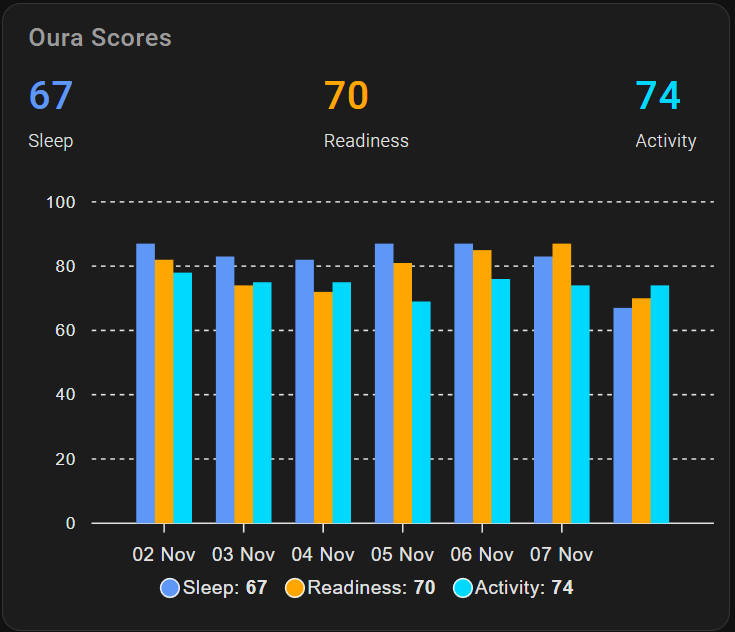
Ready-to-paste cards and automations are in Dashboard and Automation Examples: score, sleep, heart, activity, workout, mindfulness, and temperature charts (apexcharts-card), built-in entity and gauge cards, and sleep-based automations.
- OAuth setup fails: the Redirect URI on your Oura app must be exactly
https://my.home-assistant.io/redirect/oauth. See Redirect URI Fix. - Sensors unavailable: usually Oura has no value yet (new ring, missing baseline, feature not in your ring or membership). Sync the Oura app and wait for the next update.
- Anything else: the Troubleshooting Guide covers re-authentication, rate limits, statistics repair, and removal.
When opening an issue, include your Home Assistant and integration versions and the relevant log lines (redact tokens and client secrets).
| Guide | Contents |
|---|---|
| Installation Guide | Detailed setup, verification, debug logging |
| Sensor Reference | Every sensor with entity ID, unit, and notes |
| Dashboard and Automation Examples | Ready-to-paste cards and automations |
| Troubleshooting Guide | Common problems and fixes |
| Redirect URI Fix | OAuth redirect URI errors |
| Quick Reference | URLs, scopes, key entity IDs |
| Contributing | Development setup and tests |
| Project Summary | Architecture overview |
- Oura data fetched by this integration is stored only in your Home Assistant instance: current values in the state machine, history in the recorder database (
home-assistant_v2.dbby default). Nothing is sent to third parties. - To stop access, remove the Home Assistant app in your Oura account's connected apps, then delete the integration in Home Assistant. Imported long-term statistics stay until you delete them under Developer tools → Statistics; see Removing the Integration & Your Data.
- Oura's own handling of your data is covered by the Oura Privacy Policy; questions go to dataprotection@ouraring.com.
Contributions are welcome. See the Contributing Guide; tests run in Docker with docker compose -f docker-compose.test.yml run --rm test.
- Original component: nitobuendia/oura-custom-component
- Oura API: Oura Cloud API Documentation
- Development assisted by Claude Sonnet 4.6 (Anthropic AI)
If this integration helps you, you can Buy Me a Coffee or use the GitHub ❤️ Sponsor button at the top of the repository.

MIT License.
This is an unofficial integration and is not affiliated with or endorsed by Oura Health Oy.