
Install apps one shot + Winget-AutoUpdate
All in one job based on
- Download projet and extract.
- Put the Winget Application IDs you want to install in bulk in "apps_to_install.txt" file.
- Put the Winget Application IDs in "excluded_apps.txt" file to exclude them from daily upgrade job. By defaut, if this file is not present, it will use the default one from Winget-AutoUpgrade repo.
- Then, run "install.bat"
Basically useful on fresh install :)
- Open Powershell as Admin
- Run this command:
Set-ExecutionPolicy Bypass -Scope Process -Force; iex ((New-Object System.Net.WebClient).DownloadString('https://raw.githubusercontent.com/Romanitho/Winget-AllinOne/main/Winget-AllinOne.ps1'))
- Select Apps you want to install (Ctrl + click)
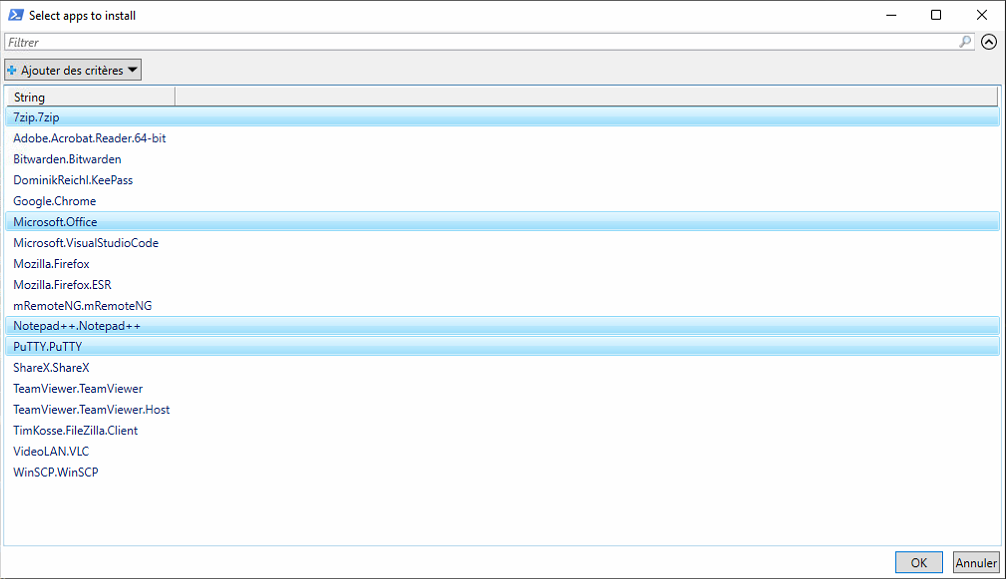
- Click OK