






Guide: Using react-broadcast-sync in a real app: dashboard filters across tabs - install, usage patterns, gotchas and recipes.
Easily sync UI state or user events across browser tabs in React apps — notifications, presence, forms, and more. This package provides a clean and type-safe abstraction over the native API, enabling efficient, scoped, and reliable cross-tab messaging.
When to use it: React apps that need to share ephemeral state or events between browser tabs of the same origin (logout, notifications, presence, draft sync). It wraps the browser BroadcastChannel API in a hook (useBroadcastChannel) and an optional BroadcastProvider.
When not to use it: syncing to a server or other devices, persisting data across reloads (use localStorage/IndexedDB), or messaging across different origins.
import { useBroadcastChannel } from 'react-broadcast-sync';

const { messages, postMessage } = useBroadcastChannel('my-channel');
postMessage('logout', { at: Date.now() }); // other tabs receive it in `messages`
- Documentation
- Features
- Why Not localStorage?
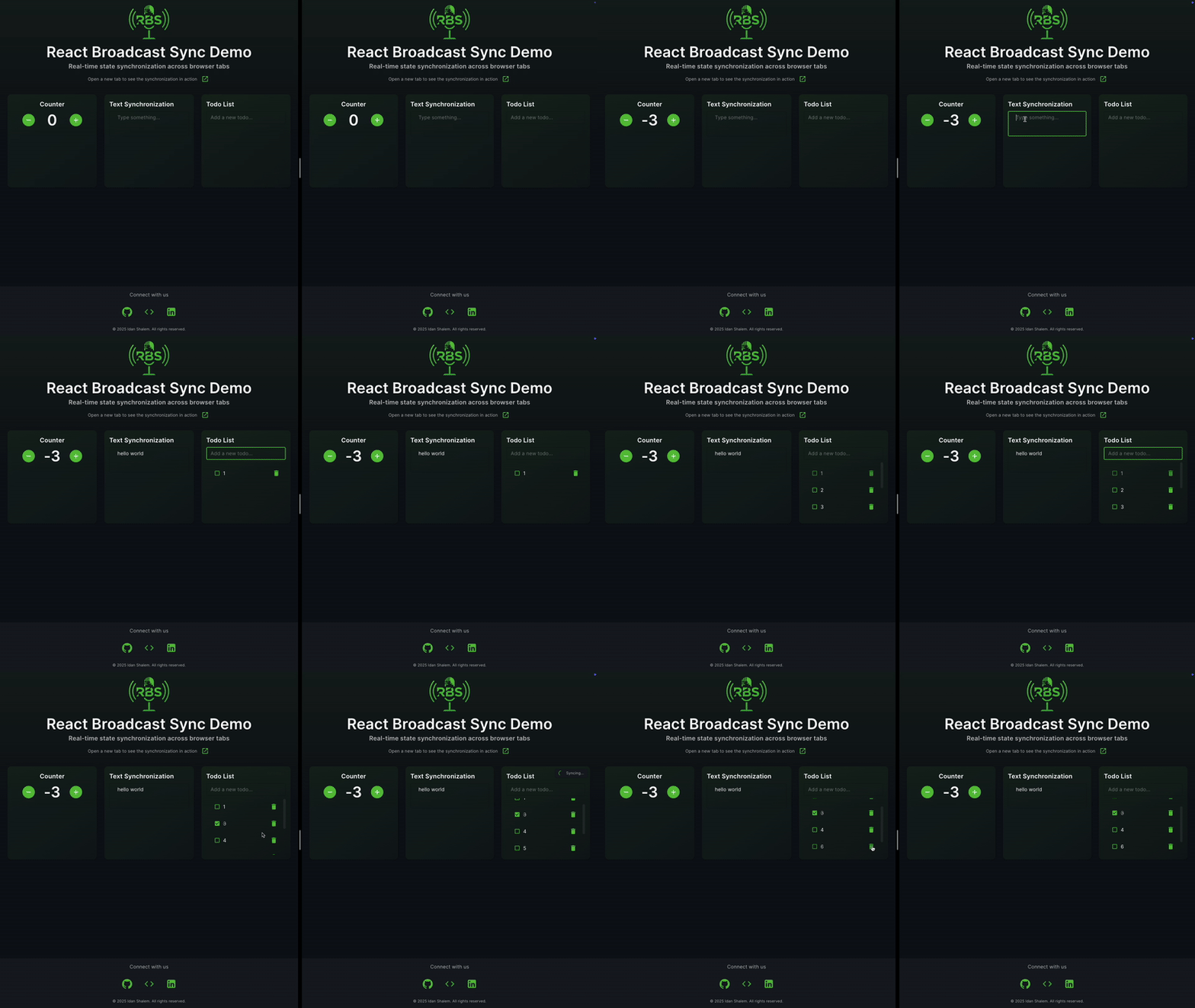
- Demo App
- Installation
- Quick Start
- Advanced Usage
- BroadcastProvider
- API Reference
- Agent Skill
- Gotchas
- Best Practices
- Common Use Cases
- Performance Considerations
- Troubleshooting
- Testing
- Browser Support
- Telemetry
- Coming Soon
- Versioning & Releases
- Contributing
- License
- Simple and intuitive API
- Real-time synchronization across tabs
- TypeScript support, with optional per-channel typed messages and payloads
- Two small runtime dependencies (
@babel/runtime,tslib) - Automatic message expiration and cleanup
- Send/receive any serializable message
- Namespace and source scoping support
- Clear individual or all messages
- Only accept allowed message types (optional)
BroadcastProviderfor context-based usage with full options support- Ping and active source detection (discover other tabs and their source names)
- Per-type
onMessagecallbacks (react to incoming messages without polling state)
The first instinct for sharing state between tabs is often localStorage plus the storage event. It works for simple cases, but it was designed for persistence, not messaging - and the ecosystem offers a few different trade-offs. Here's how react-broadcast-sync compares:
| react-broadcast-sync | localStorage + storage events |
jotai atomWithStorage |
broadcast-channel |
zustand-sync-tabs |
|
|---|---|---|---|---|---|
| What it syncs | Typed messages on named channels | Raw key-value strings | A single persisted atom value | Messages on a channel | A Zustand store's state |
| React integration | First-class hook + provider | Manual event listeners | Requires Jotai | None - framework agnostic | Requires Zustand |
| Payloads | Any serializable value | Strings only (manual JSON) | JSON-serializable value | Any serializable value | Store state |
| Message lifecycle | Expiration, deduplication, batching, selective clearing | None | None | None | Latest state only |
| Tab awareness | Source naming, ping & active-source detection | None (no event in the tab that wrote) | None | Leader election | None |
| Extra environments | Browsers (same origin) | Browsers (same origin) | React Native via AsyncStorage | Old browsers, WebWorkers, Node, Deno | Browsers (same origin) |
A few honest notes:
- If you need persistence across reloads, use a storage-based tool (
atomWithStorage, plainlocalStorage). Messages inreact-broadcast-syncare ephemeral - they notify and sync live tabs, they don't survive a refresh. - If you need old-browser, WebWorker, or Node support,
broadcast-channelis the right low-level primitive.react-broadcast-syncbuilds on the nativeBroadcastChannelAPI and gives you the React layer on top: hooks, typed messages, and lifecycle handling out of the box. - If your app already lives in Zustand or Jotai, their sync utilities may be enough.
react-broadcast-syncis state-manager agnostic - it works next to any of them, or with plainuseState.
Full documentation lives at react-broadcast-sync-docs.vercel.app: a step-by-step getting started guide, concepts, per-feature guides, the complete API reference, recipes, a tutorial, FAQ, and troubleshooting.
Two live demos are hosted on the docs site:
- Hook demo -
useBroadcastChannelsyncing a counter, text, and a todo list across tabs. - Provider demo -
BroadcastProvider+useBroadcastProvidersharing one channel through context.
The original demo app is still available at react-broadcast-sync-3w3m.vercel.app.
Check out our live demo to see the library in action! The demo showcases three main features:
-
Counter Synchronization
- Real-time counter updates across tabs
- Visual feedback for sync status
- Smooth animations
-
Text Synchronization
- Real-time text input sync
- Multi-line support
- Instant updates
-
Todo List
- Synchronized todo items
- Real-time hover effects
- Scroll position sync
- Completion status sync
- Delete functionality
The demo is built with React 19, TypeScript, Material-UI, and Framer Motion. You can find the source code in the demo directory.
npm install react-broadcast-sync
# or
yarn add react-broadcast-sync
# or
pnpm add react-broadcast-syncimport { useBroadcastChannel } from 'react-broadcast-sync';
function MyComponent() {
const { messages, postMessage, clearReceivedMessages } = useBroadcastChannel('my-channel');
const handleSend = () => {
postMessage('greeting', { text: 'Hello from another tab!' });
};
return (
<>
<button onClick={handleSend}>Send</button>
{messages.map(msg => (
<div key={msg.id}>
{msg.message.text}
<button onClick={() => clearReceivedMessages({ ids: [msg.id] })}>Clear</button>
</div>
))}
</>
);
}const {
channelName,
messages,
sentMessages,
postMessage,
sendMessage,
clearReceivedMessages,
clearSentMessages,
error,
} = useBroadcastChannel('my-channel', {
sourceName: 'my-tab',
cleaningInterval: 2000,
keepLatestMessage: true,
registeredTypes: ['greeting', 'notification'],
namespace: 'my-app',
deduplicationTTL: 10 * 60 * 1000, // 10 minutes
cleanupDebounceMs: 500, // Debounce cleanup operations by 500ms
});postMessage('notification', { text: 'This disappears in 5s' }, { expirationDuration: 5000 });postMessage is fire-and-forget. When a flow needs "send, then do X, or show an error if the send failed", use sendMessage and await it:
const { sendMessage } = useBroadcastChannel('cart');

try {
  const sent = await sendMessage('cart-updated', { count: 2 });
  // `sent` is the BroadcastMessage (id, timestamp, source) handed to the channel
} catch (e) {
  // The send provably failed: unclonable payload (DataCloneError), a closed
  // channel with recovery unavailable or exhausted, or a failed flush on close/unmount
}
The promise resolves once the message was handed to the channel - after batching and, on a provable channel close, one automatic recovery retry. BroadcastChannel has no delivery acknowledgement, so resolution never means another tab received the message (same meaning as sentMessages). A pending batched send is flushed on closeChannel()/unmount and settles with that flush. Attach a catch even for fire-and-forget calls, or a failed send surfaces as an unhandled rejection in addition to the error state. Batching, excludedBatchMessageTypes and the expiration options behave exactly as with postMessage.
You can wrap part of your app with BroadcastProvider and use useBroadcastProvider() to consume the channel context.
import { BroadcastProvider, useBroadcastProvider } from 'react-broadcast-sync';

function App() {
  return (
    <BroadcastProvider channelName="notifications">
      <NotificationBar />
    </BroadcastProvider>
  );
}

function NotificationBar() {
  const { messages } = useBroadcastProvider();

  return (
    <div>
      {messages.map(msg => (
        <p key={msg.id}>{msg.message.text}</p>
      ))}
    </div>
  );
}| Prop | Type | Required | Description |
|---|---|---|---|
channelName |
string |
✅ | The name of the broadcast channel |
options |
BroadcastOptions |
❌ | Any option accepted by useBroadcastChannel |
children |
React.ReactNode |
✅ | Component subtree |
All fields in BroadcastOptions (see the table in the API Reference) can be forwarded via the options prop. This includes namespace, registeredTypes, onMessage, keepLatestMessage, sourceName, and more.
<BroadcastProvider
  channelName="notifications"
  options={{
    namespace: 'v2',
    registeredTypes: ['alert', 'info'],
    onMessage: {
      alert: msg => showToast(msg.message.text),
    },
  }}
>
  <App />
</BroadcastProvider>messages is an event log of what other tabs sent, not the current state. To keep a piece of state
(for example dashboard filters) in sync, update local state and send one message from the handler,
and apply incoming messages with onMessage:
function Dashboard() {
  const [filters, setFilters] = useState({ status: 'all' });

  const { postMessage } = useBroadcastChannel('dashboard', {
    // sourceName is optional: a unique one is generated for each tab.
    // Do not build it inline with crypto.randomUUID(): it would change on every render.
    onMessage: {
      'filters-update': msg => setFilters(msg.message),
    },
  });

  const updateFilters = (next: typeof filters) => {
    setFilters(next);
    postMessage('filters-update', next);
  };

  return <FilterBar value={filters} onChange={updateFilters} />;
}
Do not call postMessage from a useEffect on state that you also set from incoming messages.
Each tab re-broadcasts what it receives, the tabs ping-pong, and they can end up with different
values. Deduplication is by message ID, so it does not stop this.
Messages are not replayed unless the new tab asks for them. A tab opened later only sees messages
sent after it opened, and keepLatestMessage and getLatestMessage do not change that. The
opt-in requestMessagesHistory() action (below) lets a new tab pull recent messages from the
tabs that are already open. To give a new tab the current state, you can also let it ask for it and let an
existing tab answer:
const { postMessage } = useBroadcastChannel('dashboard', {
  sourceName: sourceName, // unique per tab
  onMessage: {
    'filters-update': msg => setFilters(msg.message),
    'state-request': () => postMessage('filters-update', filtersRef.current),
  },
});

// Ask once when this tab mounts
useEffect(() => {
  postMessage('state-request', null);
}, []);
Keep the current value in a ref (filtersRef.current = filters) so the state-request handler
always answers with the latest state. If no other tab is open, nothing answers and the tab keeps its
default state.
Available in react-broadcast-sync 2.2.0 and later. Upgrade from 2.1.6 before using this hook.
import { useSyncedState } from 'react-broadcast-sync';

const [theme, setTheme, state] = useSyncedState('app', 'theme', 'light', {
  namespace: 'ui-v1',
  syncWindowMs: 250,
  validate: (value): value is string => value === 'light' || value === 'dark',
});

// Applies locally only if validation and native postMessage succeed.
const sent = setTheme('dark');
// Uses this tab's latest value. Not an atomic cross-tab operation.
setTheme(current => (current === 'light' ? 'dark' : 'light'));
const result = await state.sync();
Use this hook for one current value per key, not arbitrary message history. It opens a separate protocol channel; it does not share the message log or options of useBroadcastChannel/BroadcastProvider. All participants use useSyncedState with the same channel, namespace and key. The raw transport name is reserved and is not a public API.
- Initial value: a fallback, not a committed write. Mount requests written state from open peers. No peer or only uncommitted defaults leaves the fallback unchanged. Different defaults do not converge until someone writes. Later changes to
initialValuealone are ignored. Function values should be wrapped when using the setter; native structured clone still rejects functions. - Setter: accepts a value or functional update; returns
trueonly when validation andpostMessagesucceed, then updates locally. On unsupported browser, clone/send failure or invalid value it returnsfalseand does not commit the value. Successful send is not an acknowledgement of delivery to another tab. Treat objects as immutable. Updater exceptions are caller errors and propagate. - Sync: automatically starts on mount, can be requested explicitly, and gathers matching responses for
syncWindowMs(default 250). The value can update as greater versions arrive; it is not held until the window ends. Result isreceivedfor a matching committed peer response,no-peerif none arrives before the deadline,send-failed,cancelledfor superseded/disposed requests, orunavailablewithout an active connection.no-peerdoes not prove no tab exists or that the fallback is authoritative. A live update can arrive even when a sync returnsno-peer. - Conflict rule: greatest logical
(clock, source)version wins, independent of arrival order. Clock first, deterministic source-string tie breaker second. Responses retain the original write version. Stale/unmatched response clocks are observed but their values are not applied. A response cannot replace a newer local/live version. This is not wall-clock order, a transaction, an atomic counter, or preservation of every edit intent. - Lifecycle: key/channel/namespace changes close the old connection and start from that identity's fallback. Pending sync is cancelled. Changing only the sync window or validator does not discard the current state. React StrictMode cleanup/remount is supported.
- Options:
namespace(default''),syncWindowMs(finite 0 to 2147483647 milliseconds), and optionalvalidate(value): value is T. The validator checks incoming/local values. Malformed protocol packets and invalid incoming values are ignored; a throwing validator setserror. Without it, app values are not runtime-validated.Talone cannot validate external data. - Recovery (2.6.0+):
recovery(default'auto';'manual'opts out),maxRecoveryAttempts(default3) andonRecovered. Same policy as the message hook: only a send throwingInvalidStateErrorproves the channel died outside the library, so it is recreated and exactly that send is retried once. After a successful recovery the hook re-runs its late-join request and converges again; a local edit made while down keeps its newer version, so a stale resync reply cannot overwrite it. Unmount never auto-recovers, and a silent stall stays undetectable.onRecoveredfires after a successful automatic recovery; the resync already happened, so use it for observation. - Reconnect (2.6.0+):
state.reconnect()explicitly recreates the state channel after a creation failure or after the recovery budget ran out, then resyncs. It returnsfalseand is a no-op while a connection is open, and it never runs automatically. - Errors:
state.errorisstring | null; successful local writes clear it. There is no persistence, server sync or fallback transport; recovery from a provably dead channel is built in since 2.6.0 (see Recovery above). Unsupported browsers report an error; the local setter is unavailable. React >=16.8 is supported.
BroadcastChannel is a same-origin/partition transport, not authentication or authorization. Payload validation and version checks are not a security boundary. Business records and permissions still need an authoritative server. A closed last peer loses the shared value; do not use this as durable storage.
const {
  channelName,
  messages,
  sentMessages,
  postMessage,
  clearReceivedMessages,
  clearSentMessages,
  requestMessagesHistory,
  error,
} = useBroadcastChannel(channelName, options);interface BroadcastOptions {
sourceName?: string; // Custom name for the message source. Must be unique per tab: a tab ignores messages from its own sourceName
cleaningInterval?: number; // Interval in ms for cleaning expired messages (default: 1000)
keepLatestMessage?: boolean; // Keep only the latest message (default: false)
registeredTypes?: string[]; // List of allowed message types
namespace?: string; // Channel namespace for isolation
deduplicationTTL?: number; // Time in ms to keep message IDs for deduplication (default: 5 minutes)
cleanupDebounceMs?: number; // Debounce time in ms for cleanup operations (default: 0)
batchingDelayMs?: number; // Delay in ms to batch outgoing messages (default: 20). If > 0, messages are batched and sent together.
excludedBatchMessageTypes?: string[]; // Message types to always send immediately, never batched (default: []).
onMessage?: MessageCallback | OnMessageMap; // Callback(s) fired when a received message passes all filters (default: undefined).
recovery?: 'manual' | 'auto'; // Transport recovery policy (default: 'auto'). Recreates a provably dead channel and retries that send once; 'manual' opts out.
maxRecoveryAttempts?: number; // Max consecutive automatic recovery attempts before giving up (default: 3).
onChannelRecovered?: () => void; // Fired after a successful automatic recovery; use it to resync. Missed messages are never replayed.
telemetry?: boolean; // Deprecated no-op.
}| Option | Default Value | Description |
|---|---|---|
sourceName |
undefined |
Auto-generated if not provided |
cleaningInterval |
1000 |
1 second between cleanup runs |
keepLatestMessage |
false |
Keep all messages by default |
registeredTypes |
[] |
Accept all message types by default |
namespace |
'' |
No namespace by default |
deduplicationTTL |
300000 |
5 minutes (5 × 60 × 1000 ms) |
cleanupDebounceMs |
0 |
No debounce by default |
batchingDelayMs |
20 |
Batch delay in ms (0 = off) |
excludedBatchMessageTypes |
[] |
Types never batched |
onMessage |
undefined |
Callback(s) for received messages |
recovery |
'auto' |
'manual' opts out of auto-recovery |
maxRecoveryAttempts |
3 |
Cap on consecutive recovery attempts |
onChannelRecovered |
undefined |
Resync callback after automatic recovery |
telemetry |
false |
Deprecated no-op. No telemetry is collected |
interface BroadcastActions {
  channelName: string; // The resolved channel name (includes namespace)
  messages: BroadcastMessage[]; // Received messages
  sentMessages: BroadcastMessage[]; // Messages sent by this instance
  postMessage: (type: string, content: any, options?: SendMessageOptions) => void;
  sendMessage: (
    type: string,
    content: any,
    options?: SendMessageOptions
  ) => Promise<BroadcastMessage>; // Resolves when handed to the channel, not on delivery
  clearReceivedMessages: (opts?: { ids?: string[]; types?: string[]; sources?: string[] }) => void;
  clearSentMessages: (opts?: { ids?: string[]; types?: string[]; sync?: boolean }) => void;
  getLatestMessage: (opts?: { type?: string; source?: string }) => BroadcastMessage | null;
  requestMessagesHistory: (opts?: { types?: string[]; limit?: number }) => void;
  closeChannel: () => void;
  reconnect: () => boolean; // Explicitly recreate the channel after a creation failure or closeChannel()
  error: string | null; // Current error state
}Returns an object with:
| Property | Type | Description |
| -------------------------- | -------------------- | --------------------------------------------------------------------------------------------------------------------------------------------------------------------------------------------------------------------------------------------------------------------------------- | --- |
| channelName | string | The resolved channel name (includes namespace) |
| messages | BroadcastMessage[] | All received messages from other tabs |
| sentMessages | BroadcastMessage[] | Local send attempts (including queued/failed sends), not delivery acknowledgements |
| postMessage() | function | Send a message to all tabs (fire-and-forget) |
| sendMessage() | function | Promise-returning send: resolves with the sent message once it was handed to the channel (after batching and at most one auto-recovery retry); rejects on an unclonable payload, a closed/unrecovered channel, or a failed flush on close/unmount. Not a delivery acknowledgement | |
| clearReceivedMessages() | function | Clear received messages. No filters ⇒ clear all. With filters, a message is deleted only if it matches every provided filter (ids, types, sources). Empty arrays act as wildcards. |
| clearSentMessages() | function | Clear messages this tab sent (same matching rules). Pass sync: true to broadcast the clear to other tabs. |
| getLatestMessage() | function | Get the latest message matching optional filters (type, source). Returns the most recent message that matches, or null if none. |
| requestMessagesHistory() | function | Ask other open tabs to replay recent messages into messages. Replayed entries carry isHistory: true and never fire onMessage. Options: types (filter), limit (max recent messages each tab sends back, default 50, up to 500). |
| ping(timeoutMs?) | function | Ping other tabs on the channel and collect their source names. timeoutMs (default: 300ms) controls how long to wait for responses before resolving. Returns a Promise of string array. |
| isPingInProgress | boolean | true while a ping is active, otherwise false. |
| closeChannel() | function | Explicitly closes the broadcast channel and removes event listeners. Safe to call multiple times. |
| reconnect() | function | Explicitly recreates the channel after a creation failure or a deliberate closeChannel(). Returns false (no-op) while a connection is open. Never runs automatically. Keeps source identity and message logs; does not resend or replay missed messages. |
| error | string \| null | Any runtime error from the channel |
A tab that opened late can ask the tabs that are already open for their recent messages:
const { messages, requestMessagesHistory } = useBroadcastChannel('dashboard');

// Accept up to 50 unique recent messages in total
requestMessagesHistory();

// Narrow it down: only chat messages, at most 10 unique ones in total
requestMessagesHistory({ types: ['chat'], limit: 10 });
How multiple tabs answer: every open tab that holds matching messages sends its own newest
messages (at most limit), and the requesting tab unions all answers, deduplicates by message
ID, and keeps the newest limit unique messages (default 50, max 500). So with 3 tabs open
you get each message exactly once, no tab is picked as the source (no tab is guaranteed to
hold the full log), and no tab gets priority for answering first: if a later answer carries a
newer message, it replaces an older replayed one from the same request. The merged entries are
inserted into messages in timestamp order, displayed oldest-to-newest, and live messages
already in the log are preserved.
Behavior to know:
- Replayed entries are appended to
messageswithisHistory: trueand never fireonMessage, so replay cannot re-run side effects (toasts, logout flows, sounds). - Duplicates are dropped by message ID, across live messages and across several responding tabs.
- Messages you cleared with
clearReceivedMessages()are not resurrected: a full clear makes replay accept only entries newer than the clear, and a filtered clear blocks exactly the messages it removed. The clear stays local to your tab and is not propagated. - Expired messages are never replayed, and each responding tab also caps the size of its own answer (serialized byte cap, dropping its oldest entries first), so a large log cannot flood the channel.
- History responses are consumed by the requesting tab only and are never re-broadcast.
// Clear everything we've received
clearReceivedMessages();

// Clear all messages we sent and broadcast the clear to other tabs
clearSentMessages({ sync: true });

// Clear by id or by type (OR inside each array)
clearReceivedMessages({ ids: ['123'] }); // id match
clearReceivedMessages({ types: ['alert', 'chat'] }); // type match

// Combine filters (logical AND between filters)
// Removes messages whose id is '123' AND type is 'alert'
clearSentMessages({ ids: ['123'], types: ['alert'] });interface SendMessageOptions {
expirationDuration?: number; // TTL in ms
expirationDate?: number; // Exact expiry timestamp
}interface BroadcastMessage {
id: string;
type: string;
message: any;
timestamp: number;
source: string;
expirationDate?: number;
}You can use getLatestMessage to retrieve the most recent message received, optionally filtered by type and/or source. If no options are provided, it returns the latest message of any kind. If no message matches, it returns null.
Signature:
getLatestMessage(options?: { type?: string; source?: string }): BroadcastMessage | nullExamples:
// Get the latest message of any type/source
const latest = getLatestMessage();

// Get the latest message of a specific type
const latestAlert = getLatestMessage({ type: 'alert' });

// Get the latest message from a specific source
const latestFromTab = getLatestMessage({ source: 'tab-123' });

// Get the latest message of a specific type from a specific source
const latestInfoFromTab = getLatestMessage({ type: 'info', source: 'tab-123' });

// Check if there are any messages of a type
if (getLatestMessage({ type: 'notification' })) {
  // ...
}
Behavior:
- If no messages are present, returns
null. - If no message matches the filter, returns
null. - If multiple messages match, returns the most recently received one.
useBroadcastChannel provides a ping method and an isPingInProgress state for discovering active sources (tabs) on the same channel.
ping(timeoutMs?: number): Promise<string[]>: Broadcasts a ping and collects responses from other tabs within the timeout. Returns an array of source names (excluding your own).isPingInProgress: boolean: Indicates if a ping is currently in progress.
Example:
const { ping, isPingInProgress } = useBroadcastChannel('my-channel', {
  sourceName: 'my-tab',
});

// To discover other active sources:
const activeSources = await ping(300); // e.g., ['tab-2', 'tab-3']

// To show loading state:
if (isPingInProgress) {
  // Show spinner or status
}You can use closeChannel to explicitly close the underlying BroadcastChannel and remove all event listeners. This is useful if you want to clean up resources before the component unmounts, or to stop all cross-tab communication on demand. Note that the channel will automatically close and all event listeners will be removed when the component unmounts, so this method is mainly useful for manual cleanup.
Signature:
closeChannel(): voidExample:
const { closeChannel } = useBroadcastChannel('my-channel');

// ... later, when you want to stop all communication:
closeChannel();
Notes:
- After calling
closeChannel, the channel is closed and will not send or receive any more messages. - It is safe to call
closeChannelmultiple times (idempotent). - You do not need to call this for normal React unmounting; the hook will clean up automatically. Use it for explicit/manual cleanup only.
If creating the channel fails (for example a transient browser error) or you deliberately closed it with closeChannel(), the hook stays disconnected until you explicitly call reconnect():
const { error, reconnect } = useBroadcastChannel('my-channel');

// e.g. from a "Try again" button when error says the channel could not be created:
const reopened = reconnect(); // true when a new connection was created
Notes:
reconnect()is a no-op that returnsfalsewhile a connection is open — a working channel is never replaced.- The hook recovers on its own when a channel provably dies outside its control (see Automatic Recovery below).
reconnect()remains the explicit path after a creation failure, aftercloseChannel(), and after automatic recovery has exhausted its attempts. Passrecovery: 'manual'to make every recovery an explicit application decision. - Reconnecting keeps this tab's source identity and its
messages/sentMessageslogs. It does not resend or replay anything; to resynchronize data after downtime userequestMessagesHistory()oruseSyncedState(which resyncs itself after a recovery since 2.6.0). - A
messageerror(an incoming payload that failed to deserialize) is reported througherroras a read failure. It is not treated as a disconnection.
Some channels die outside the library's control: application code closes a shared BroadcastChannel, a hot reload tears it down, a test harness kills it. By default (recovery: 'auto') the hook recovers on its own, but only on proof of death. With recovery: 'manual' it instead reports an error and waits for your reconnect():
const { error } = useBroadcastChannel('my-channel', {
  recovery: 'auto', // default; pass 'manual' to opt out
  maxRecoveryAttempts: 3, // default
  onChannelRecovered: () => {
    // e.g. call requestMessagesHistory() or resync useSyncedState here;
    // messages missed while the channel was down are never replayed
  },
});
What triggers recovery: a send throwing InvalidStateError. Per the HTML standard, that exception is thrown only when the channel object was closed, and the throw happens before the message is serialized or delivered anywhere — so the failed send provably never left this tab, and retrying it once on the fresh channel cannot duplicate delivery.
What never triggers recovery:
- A deliberate
closeChannel()or unmount. An explicit close stays closed. - A payload error (
DataCloneError). That is a message problem, not a dead channel. - Silence. A channel that can still send but no longer receives is indistinguishable from a quiet one, so no automatic policy watches for it. If your application needs that, close and reconnect on its own schedule.
Recovery is bounded: after maxRecoveryAttempts consecutive failed attempts the channel stays down, error reports that the channel is closed, and only an explicit reconnect() revives it. onChannelRecovered is your resync point: the library restores the transport, never the missed data.
onMessage lets you react to incoming messages imperatively — without polling messages state or using useEffect. The callback fires after the message is added to state and only for messages that pass all active filters (registeredTypes, expiry, deduplication, self-filter). Internal protocol messages (PING, PONG, CLEAR_SENT_MESSAGES) never trigger it.
Two supported shapes:
// 1. A single catch-all function — fires for every accepted message type
type MessageCallback = (msg: BroadcastMessage) => void;

// 2. A map from message type → one handler function
type OnMessageMap = { [type: string]: (msg: BroadcastMessage) => void };
Catch-all example:
const { postMessage } = useBroadcastChannel('my-channel', {
  onMessage: msg => {
    console.log('received', msg.type, msg.message);
  },
});
Per-type map example:
useBroadcastChannel('my-channel', {
  onMessage: {
    error: msg => showToast(`Error: ${msg.message.text}`),
    success: msg => celebrate(),
    log: msg => console.log('[log]', msg.message),
  },
});
Behavior:
- Fires for messages from other tabs only — self-messages are always ignored before this point.
- Fires after
messagesstate is updated — both the callback argument andmessages[messages.length - 1]will be the same object. - A type not listed in the map causes no error — it is silently skipped.
- If the callback throws, the error is caught and debug-logged. Message state is not affected.
- Changing
onMessagebetween renders is safe — the latest callback is always used with no stale closure risk. - Works with batched messages: each message in a batch triggers its own callback call.
The package no longer collects any telemetry. The telemetry option is still accepted as a deprecated no-op so existing code keeps compiling; it will be removed in the next major version.
Available in react-broadcast-sync 2.5.0 and later. Optional: without the generic, the API keeps the loose
string/anybehavior.
Declare a channel's message types and payload shapes once, and postMessage, onMessage, getLatestMessage and the clear/history options are checked at compile time instead of failing silently in another tab:
import { useBroadcastChannel } from 'react-broadcast-sync';

// One definition per channel, shared by every tab that uses it.
type DashboardEvents = {
  filter: { range: string; team: string };
  logout: undefined;
};

const { postMessage, messages } = useBroadcastChannel<DashboardEvents>('dashboard', {
  onMessage: {
    filter: msg => console.log(msg.message.range), // typed payload
  },
});

postMessage('filter', { range: '7d', team: 'a' }); // ok
postMessage('logout'); // ok: `undefined` payload, second argument optional
postMessage('filter', { range: 7 }); // compile error: payload shape mismatch
postMessage('flter', {}); // compile error: unknown message typeuseBroadcastChannel<T>,BroadcastProvider<T>anduseBroadcastProvider<T>()all take the same message map. Each channel declares its own map; two channels can use completely different contracts.onMessagemap keys,registeredTypes,excludedBatchMessageTypesand thetypesfilters ofclearReceivedMessages/clearSentMessages/requestMessagesHistoryaccept only declared types.getLatestMessage({ type })returns the matching payload type, andmessages/sentMessagesnarrow bytypeas a discriminated union.- Types only, erased at compile time: no runtime validation and no runtime behavior or wire-format change. Tabs running older library versions keep working.
- Export the map from a shared module and import it everywhere the channel is used: TypeScript cannot check that two tabs declared the same contract separately.
The package ships an agent skill at skills/react-broadcast-sync/SKILL.md (the agentskills.io format) with safe recipes for coding agents. Nothing is installed automatically: there is no postinstall script and your agent settings are never modified. To use it, copy it into your project yourself:
mkdir -p .agents/skills
cp -r node_modules/react-broadcast-sync/skills/react-broadcast-sync .agents/skills/
Tools such as skills-npm can also extract it for you. Check your agent's docs for where it reads skills from.
- Duplicate
sourceName: a tab ignores any message whosesourceequals its ownsourceName. If two tabs use the samesourceName, they will not receive each other's messages. Leave it unset (a unique name is generated) unless you need a stable name, and keep it unique per tab. keepLatestMessageis one slot: withkeepLatestMessage: true,messagesholds only the single most recent message across all types, so a"b"message replaces a prior"a". UseregisteredTypesor separate channels/namespaces if you need the latest message per type.cleanupDebounceMsvscleaningInterval: cleanup is debounced. IfcleanupDebounceMsis longer thancleaningInterval, each interval tick restarts the debounce and expired messages may never be removed. KeepcleanupDebounceMssmaller thancleaningInterval.- Deduplication is by message ID, not content (see Message Deduplication).
- Same origin only:
BroadcastChanneldoes not cross origins, and a tab does not receive its own messages. - No telemetry: the
telemetryoption is a deprecated no-op (see Telemetry).
- Use
namespaceto isolate functionality between different app modules. - Register allowed message types using
registeredTypesto avoid processing unknown or irrelevant messages. - Always handle
errorstate in UI or logs to detect channel failures. - Use
keepLatestMessage: trueif you only care about the most recent message (e.g. status updates). - Set appropriate
deduplicationTTLbased on your message frequency and importance. - Use
cleanupDebounceMswhen dealing with rapid message updates to prevent performance issues. - Use
onMessagefor imperative side-effects (toasts, analytics, logging) rather thanuseEffectonmessages— it fires exactly once per accepted message, with no extra renders required.
function NotificationSystem() {
  const { messages, postMessage } = useBroadcastChannel('notifications', {
    keepLatestMessage: true,
    registeredTypes: ['alert', 'info', 'warning'],
    deduplicationTTL: 60000, // 1 minute
  });

  return (
    <div>
      {messages.map(msg => (
        <Notification key={msg.id} type={msg.type} content={msg.message} />
      ))}
    </div>
  );
}function FormSync() {
const { messages, postMessage } = useBroadcastChannel('form-sync', {
namespace: 'my-form',
cleaningInterval: 5000,
});
const handleChange = (field: string, value: string) => {
postMessage('field-update', { field, value }, { expirationDuration: 300000 }); // 5 minutes
};
return <Form onChange={handleChange} />;
}function TabStatus() {
const { postMessage } = useBroadcastChannel('tab-status', {
sourceName: 'main-tab',
keepLatestMessage: true,
});
useEffect(() => {
postMessage('tab-active', { timestamp: Date.now() });
return () => postMessage('tab-inactive', { timestamp: Date.now() });
}, []);
return null;
}- Keep messages small and serializable
- Avoid sending large objects or circular references
- Consider using message IDs to reference larger data
- Use
keepLatestMessage: truefor high-frequency updates - Implement debouncing for rapid state changes
- Consider using
expirationDurationfor temporary messages
Batching allows you to group multiple outgoing messages and send them together in a single post to the BroadcastChannel. This can significantly reduce the number of cross-tab events, improve performance, and avoid flooding the channel when many messages are sent in rapid succession (e.g., during fast typing or bulk updates).
- batchingDelayMs: If set to a value greater than 0 (default: 20ms), outgoing messages are collected for up to this delay and then sent as an array. If 0 or negative, batching is disabled and all messages are sent immediately.
- excludedBatchMessageTypes: An array of message types that should always be sent immediately, even if batching is enabled. Use this for urgent or high-priority messages (e.g., 'alert', 'sync-now').
How it works:
- When batching is enabled, calls to
postMessagewithin the batching window are buffered and sent as a batch (array of messages) after the delay. - On the receiving side, the hook automatically handles both single messages and batches (arrays). If you listen to the channel directly, always check if
Array.isArray(event.data). - If the tab unmounts or the channel closes, any unsent batched messages are flushed immediately.
Why batching matters:
- Reduces the number of events and improves efficiency, especially for high-frequency updates.
- Prevents message storms that can occur when many updates happen in a short time.
- Lets you control which messages are always sent immediately for real-time needs.
Example:
const { postMessage } = useBroadcastChannel('my-channel', {
  batchingDelayMs: 50, // Batch messages for up to 50ms
  excludedBatchMessageTypes: ['alert'], // Always send 'alert' immediately
});

// These will be batched if sent within 50ms
postMessage('edit', { field: 'a', value: 1 });
postMessage('edit', { field: 'b', value: 2 });
// This will be sent immediately
postMessage('alert', { message: 'Something happened!' });- Clear messages when they're no longer needed using
clearReceivedMessages/clearSentMessages - Use
cleaningIntervalto automatically remove expired messages - Implement proper cleanup in component unmount
The deduplicationTTL option creates a time window (in milliseconds) during which a received message with an already-seen message ID is ignored. Deduplication is by ID, not by content: two separate postMessage calls with identical type and payload get different IDs and are both delivered. This is particularly useful for:
- Preventing Message Loops: Avoids infinite message echo between tabs when they broadcast the same message back and forth
- Reducing Redundancy: Drops the same message if it is delivered to a tab more than once within the window
Recommended TTL values based on use case:
- High-frequency updates (e.g., real-time typing, cursor position): 1000-5000ms
- Medium-frequency updates (e.g., form sync, status changes): 5000-15000ms
- Low-frequency updates (e.g., notifications, alerts): 15000-30000ms
Example:
// Without deduplication, this could cause a message loop
function ChatComponent() {
  const { postMessage } = useBroadcastChannel('chat', {
    deduplicationTTL: 5000, // Ignore duplicate messages for 5 seconds
  });

  const handleMessage = (text: string) => {
    postMessage('chat-message', { text });
  };
}- Use
cleanupDebounceMsto prevent excessive cleanup operations - Recommended values:
- For frequent updates: 500-1000ms
- For infrequent updates: 0ms (no debounce)
- Adjust
cleaningIntervalbased on your message expiration needs
-
Messages Not Received
- Check if
registeredTypesincludes your message type - Verify the channel name and namespace match
- Ensure the message hasn't expired
- Check if
deduplicationTTLisn't too short
- Check if
-
Performance Issues
- Increase
cleanupDebounceMsif cleanup is too frequent - Use
keepLatestMessage: truefor high-frequency updates - Consider increasing
cleaningIntervalif cleanup is too aggressive
- Increase
-
Memory Leaks
- Ensure proper cleanup in component unmount
- Use message expiration for temporary data
- Clear messages when they're no longer needed
Enable debug logging by setting the environment variable:
REACT_APP_DEBUG_BROADCAST=trueThis will log:
- Channel creation and closure
- Message sending and receiving
- Cleanup operations
- Error states
import { renderHook, act } from '@testing-library/react-hooks';
import { useBroadcastChannel } from 'react-broadcast-sync';

test('postMessage records the message in sentMessages', () => {
  const { result } = renderHook(() => useBroadcastChannel('test-channel'));

  act(() => {
    result.current.postMessage('test', { data: 'hello' });
  });

  // The hook does not echo your own messages back into `messages`.
  // `messages` only holds messages sent by other tabs or hook instances.
  expect(result.current.messages).toHaveLength(0);
  expect(result.current.sentMessages).toHaveLength(1);
  expect(result.current.sentMessages[0].message.data).toBe('hello');
});
To test receiving, render two hooks with different sourceName values on the same channel name
(this needs a BroadcastChannel implementation in the test environment, such as a mock that
delivers to other instances). The message sent by one appears in the other's messages.
import { render, screen } from '@testing-library/react';
import { BroadcastProvider } from 'react-broadcast-sync';

test('should render messages from provider', () => {
  render(
    <BroadcastProvider channelName="test-channel">
      <TestComponent />
    </BroadcastProvider>
  );

  // Your test assertions here
});The repository has two test suites:
# Unit tests (Jest + jsdom)
npm test

# Cross-tab integration tests (Playwright + Chromium, Firefox, and WebKit)
npx playwright install --with-deps chromium firefox webkit   # one-time browser install
npm run test:integration
The integration suite runs each test in Chromium, Firefox, and WebKit. It serves a
small React app from integration/app and drives real browser tabs through the public
hook API: message delivery between tabs,
self-filtering, namespace isolation, registeredTypes filtering, ping source
discovery, synced clearSentMessages, local clearReceivedMessages, and message
expiration.
Relies on BroadcastChannel API:
- ✅ Chrome 54+
- ✅ Firefox 38+
- ✅ Edge 79+
- ✅ Safari 15.4+
- ✅ Opera 41+
The package no longer collects any telemetry. The telemetry option is still accepted as a deprecated no-op so existing code keeps compiling; it will be removed in the next major version.
These are design directions, not committed releases. Current status and scope matter more than the age of an open issue.
-
Automatic Channel Recovery
Shipped: explicitreconnect()for transport recreation, and automatic recovery (defaultrecovery: 'auto';'manual'opts out) that recreates a provably dead channel (a send threwInvalidStateError) and retries that send once, bounded bymaxRecoveryAttempts. Still open in principle: silent receive failures are not detectable, so no automatic policy covers them. See the failure qualification. -
Cross-tab History (
withHistory)
Proposed, not implemented: a bounded opt-in history request for late joiners. Size limits, expiry/clear filtering, deduplication and replay side effects need a contract before an API. This is distinct from releaseduseSyncedStatecurrent-value bootstrap. -
Integration Tests
Already included: native Chromium, Firefox and WebKit cross-tab tests. -
Anonymous Usage Telemetry
Removed. Thetelemetryoption remains as a deprecated no-op.
We're committed to keeping this package lightweight, flexible, and production-ready.
Your feedback and contributions are welcome — feel free to open an issue!
This project uses Semantic Release for fully automated versioning and changelog generation.
Every push to the main branch with a Conventional Commit message triggers a release that includes:
- ✅ Automatic semantic version bump (
major,minor, orpatch) - ✅ Changelog generation and publishing to GitHub Releases
- ✅ Publishing to npm
feat: add support for per-type callbacks
fix: debounce cleanup runs properly on tab reload
chore: update dependencies

---

## Contributing

PRs and feature suggestions welcome! Open an issue or submit a pull request.

---

## License

MIT © [Idan Shalem](https://github.com/IdanShalem)